AIDI 3.1 secondary development tutorial (C#)
1. Tutorial Introduction
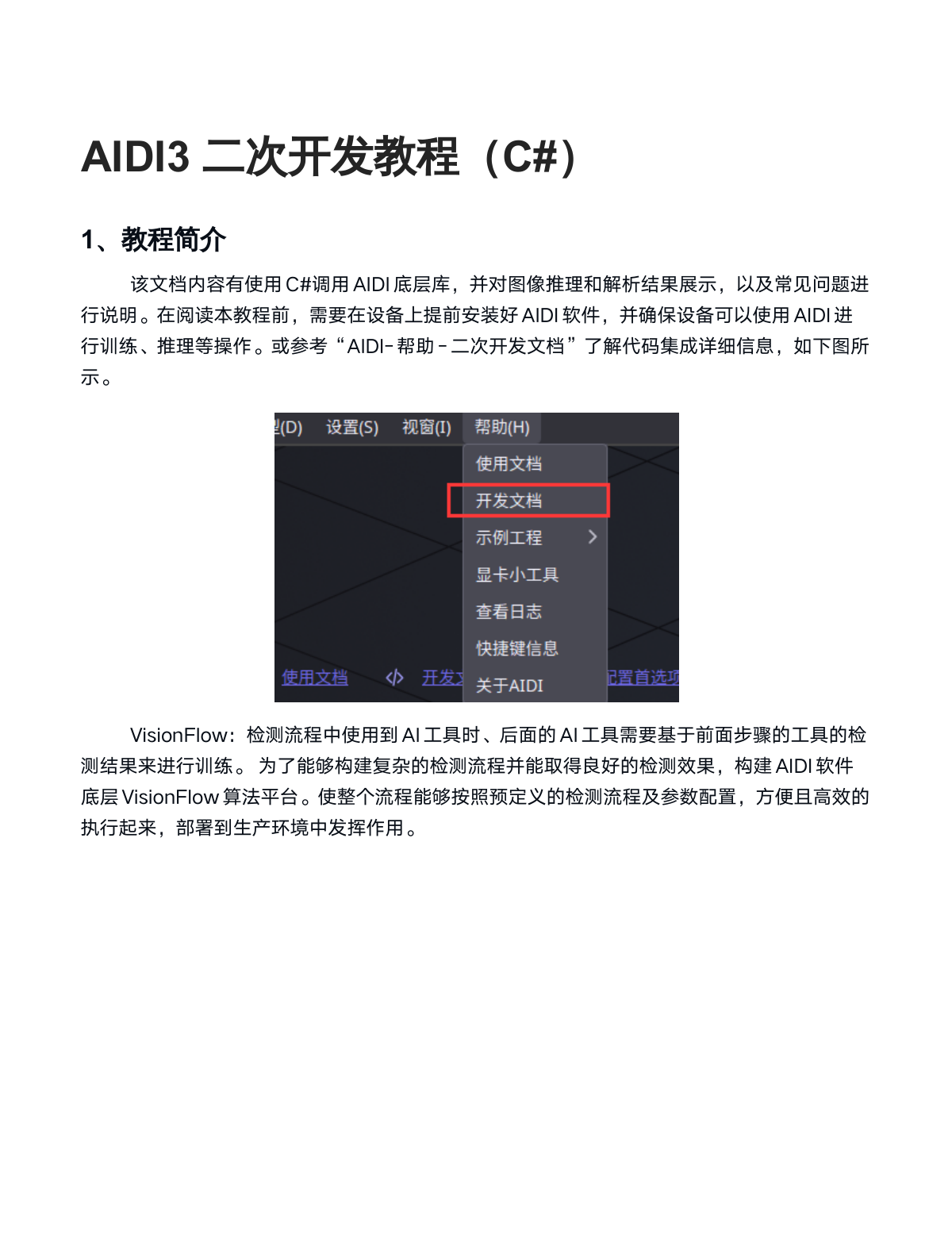
This document explains how to call AIDI underlying libraries using C#, demonstrating image inference, result parsing, and addressing common issues. Before reading this tutorial, ensure that AIDI software is installed on your device and that your device can use AIDI for training, inference, and other operations. Alternatively, refer to "AIDI - Help - Secondary Development Documentation" for detailed information about code integration, as shown in the figure below.
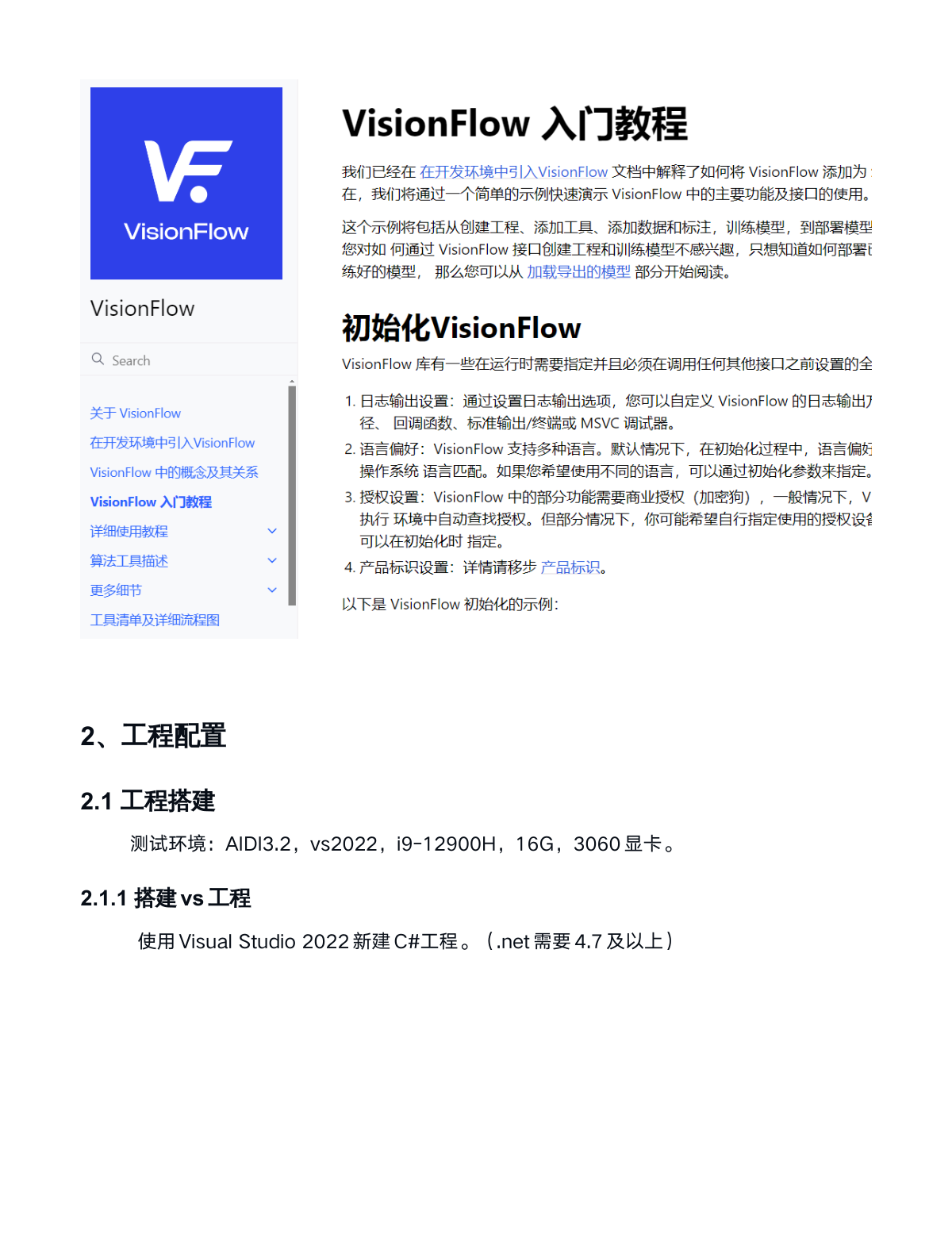
VisionFlow: When using AI tools in the detection workflow, subsequent AI tools need to base their training on detection results from previous steps. To build complex detection workflows with excellent detection performance, AIDI software provides the underlying VisionFlow algorithm platform. This allows the entire workflow to execute efficiently according to predefined detection processes and parameter configurations, making it convenient to deploy to production environments.
2. Project Configuration
2.1 Project Setup
Test Environment: AIDI 3.2, VS2022, i9-12900H, 16GB RAM, RTX 3060.
2.1.1 Setting Up a VS Project
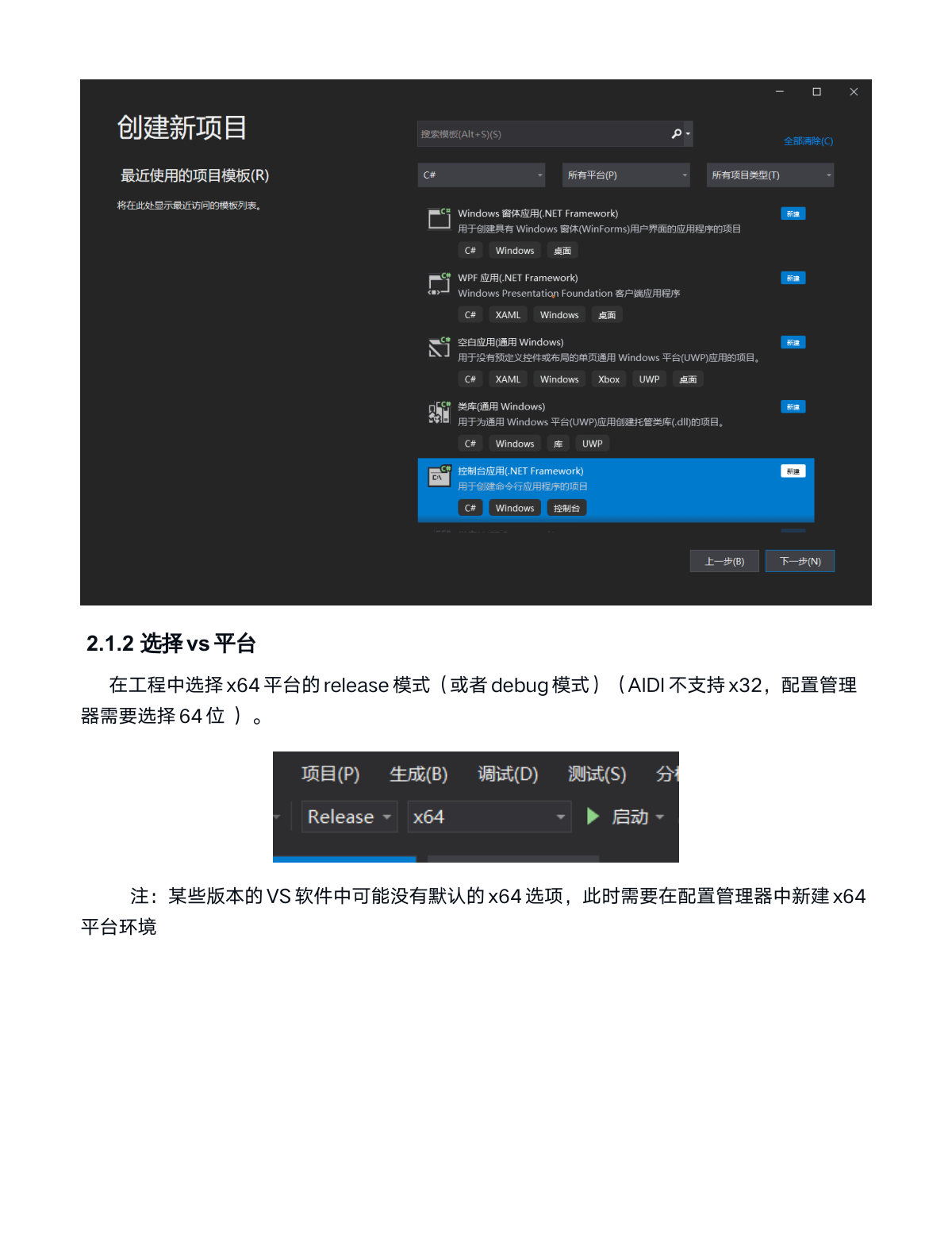
Create a new C# project using Visual Studio 2022. (.NET 4.7 or higher required)
2.1.2 Selecting the VS Platform
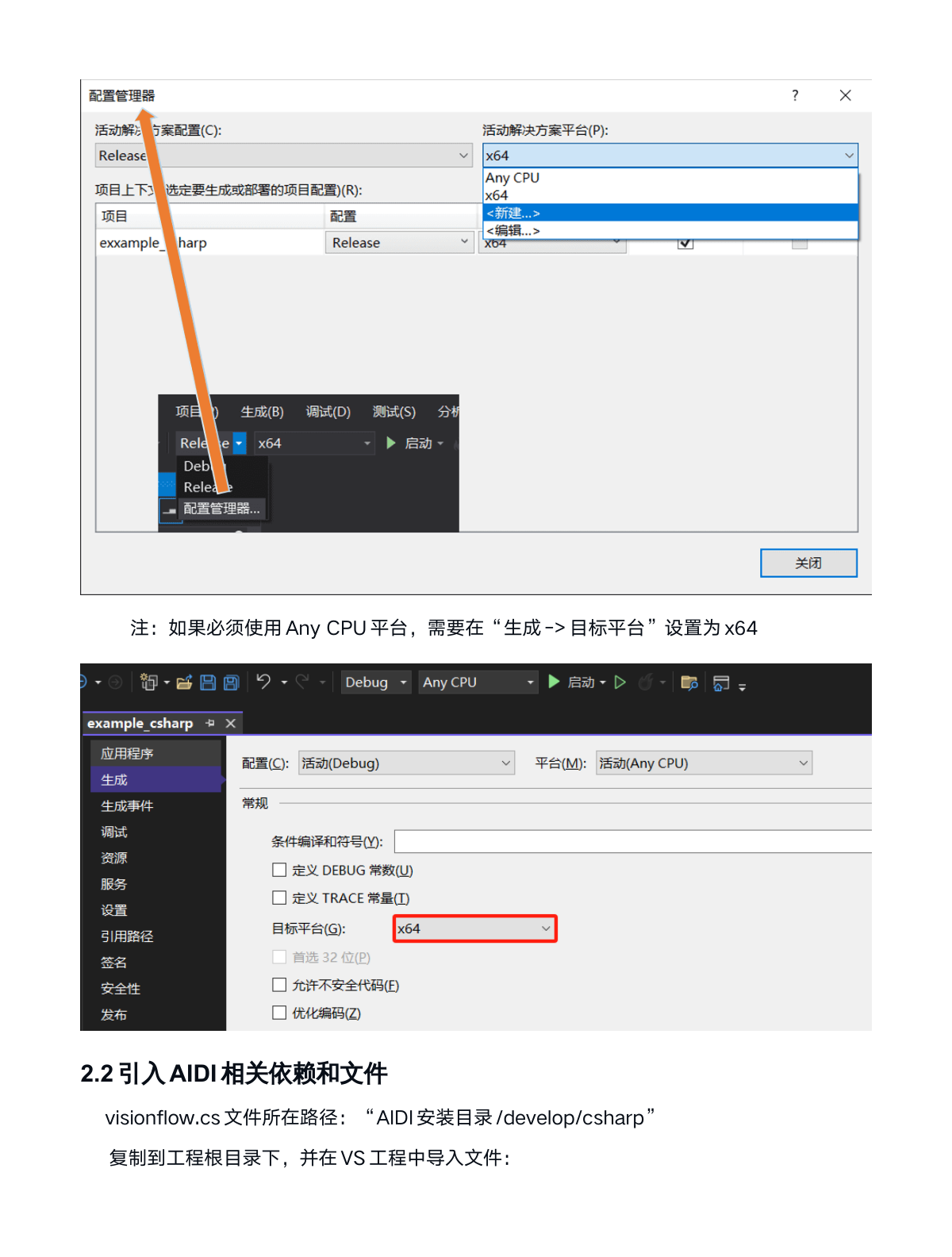
Select the x64 platform in release mode (or debug mode) for your project. (AIDI does not support x32; the configuration manager must select 64-bit)
Note: Some versions of VS may not have the default x64 option by default. In such cases, you need to create an x64 platform environment in the configuration manager.
Note: If you must use the Any CPU platform, set "Build - Target Platform" to x64
2.2 Importing AIDI-Related Dependencies and Files
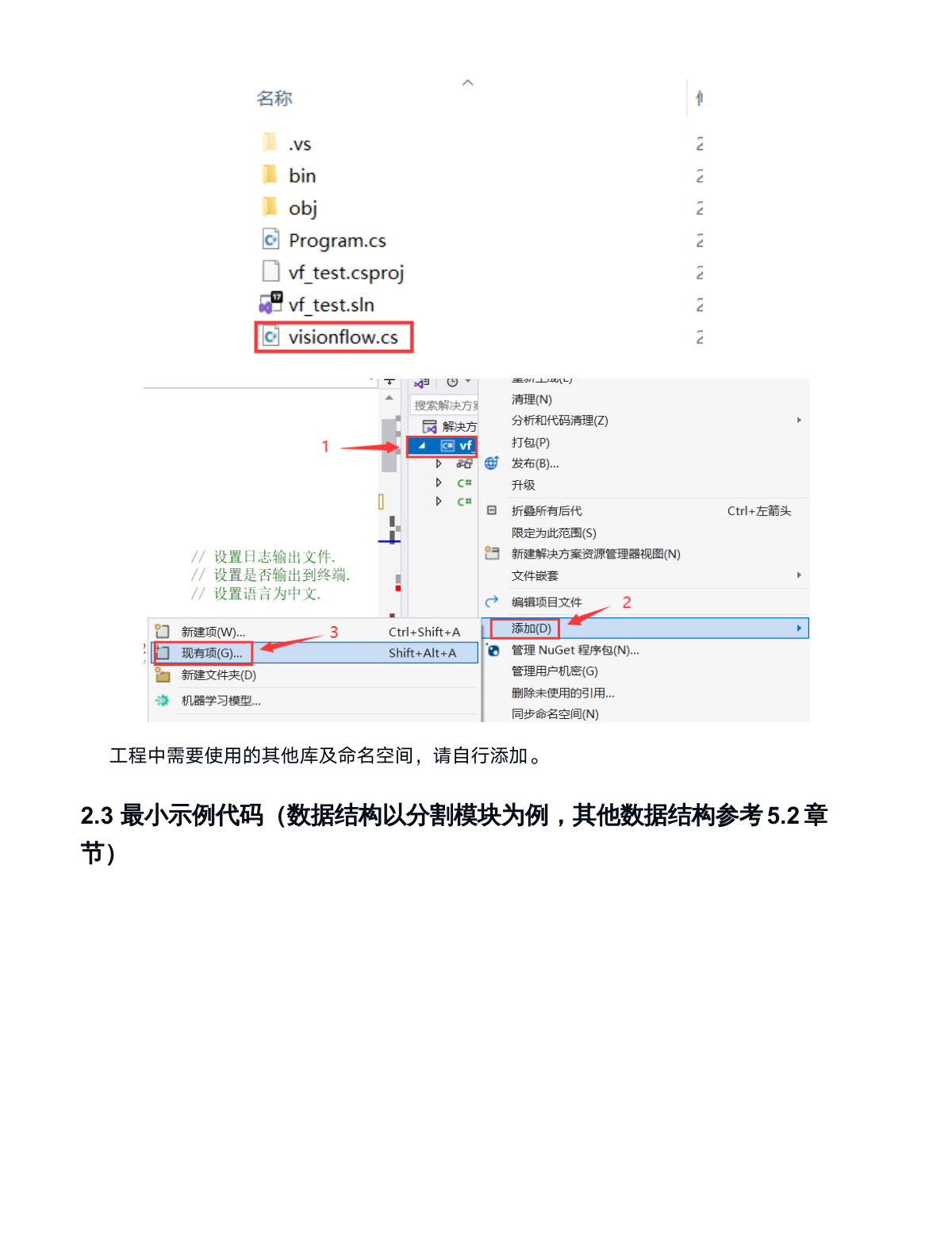
Location of visionflow.cs file: "AIDI Installation Directory /develop/csharp"
Copy it to the project root directory and import the file in your VS project.
Add other necessary libraries and namespaces as needed for your project.
2.3 Minimal Example Code
(Data structure uses the segmentation module as an example; refer to section 5.2 for other data structures)
using System;
using System.Runtime.InteropServices;
using visionflow.param;

public class Program
{
    /*Main function*/
    public static void Main()
    {
        visionflow.Model model;          //宣告模型變數
        visionflow.img.Image image;      //宣告圖像變數
        visionflow.Runtime runtime;      //宣告模型變數
        visionflow.Sample sample;        //宣告樣本變數
        string model_path = "Path/示例模型/111.vfmodel";
        string img_path = "Path/示例圖像/1.png"; //輸入圖像路徑
        string input_id = "";            //自動取得不用更改
        //需要和工程中的節點名稱一致,否則會導致模型推理失敗
        string defect_id = "分割";

        //模型載入函數,開啟視覺系統呼叫一次,模型載入到顯存中。不需要每次呼叫
        Load_Model(ref model_path, ref input_id, ref defect_id, out model, out runtime);
        //模型推理圖像函數
        infer_image(ref input_id, ref img_path, ref runtime, out sample, out image);
        //結果解析函數
        Result_analysis(ref input_id, ref defect_id, ref img_path, ref sample, ref image);
    }

    /*Model Loading*/
    private static void Load_Model(ref string model_path, ref string input_id, ref string defect_id,
                                   out visionflow.Model model, out visionflow.Runtime runtime)
    {
        visionflow.InitOptions opts = new visionflow.InitOptions();
        opts.logger.file_sink = "visionflow.log"; // 設定日誌輸出文件.
        opts.logger.stdout_sink = true;   // 設定是否輸出到終端.
        opts.language = "zh_CN";          // 設定語言為中文.

        visionflow_global.initialize(opts);       // 初始化.
        model = new visionflow.Model(model_path); // 載入模型.
        var tool_list = model.tool_list();        // 取得模型中的工具信息.

        //選擇節點推理模式「快速啟動」、「極速推理」、「極速推理高精度」。非程序運行必須代碼
        //當不設定參數時,推理模式和AIDI軟體「測試參數-推理模式」一致
        var test_node_id = new visionflow.ToolNodeId(defect_id, "batch_size");
        var test_Type = new visionflow.param.InferenceBatchSize();
        //InferType.QuickStart 快速啟動
        //InferType.FastProcessing 極速推理
        //InferType.FastProcessingHighPrecision 極速推理高精度
        test_Type.set_infer_mode(InferType.QuickStart); //設定推理模式

        model.set_param(test_node_id, test_Type);

        var strategy = new visionflow.runtime.AllTools();
        //設定gpu推理
        strategy.options.allow_max_gpu_num = 1;
        var gpu_ids = new std.VectorInt {0};
        strategy.options.specified_gpu_ids = gpu_ids;
        //設定cpu推理
        //strategy.options.allow_run_on_cpu = true;
        //strategy.options.allow_max_gpu_num = 0;
        strategy.options.ignore_update_time_requirement = true;
        strategy.options.allow_unrealized_oper = true;
        runtime = model.create_runtime(strategy); //初始化模型
        var input_list = new std.VectorString(); //自動取得輸入節點名稱
        foreach (var tool in tool_list)
        {
            if (model.tool_info(tool).type() == "Input") input_list.Add(tool);
        }
        if (input_list.Count != 1)
        {
            Console.WriteLine("Input nodes are not unique!");
        }
        input_id = input_list[0];
    }

    /*Model Inference*/
    public static void infer_image(ref string input_id, ref string img_path, ref visionflow.Runtime runtime,
                                   out visionflow.Sample sample, out visionflow.img.Image image)
    {
        sample = runtime.create_sample();    // 建立圖片樣本
        image = visionflow.img.Image.FromFile(img_path);
        /*模型推理*/
        visionflow_helpers_global.add_image_to_sample(sample, image, input_id);
        runtime.execute(sample);
    }

    /*Result Parsing*/
    public static void Result_analysis(ref string input_id, ref string defect_id, ref string img_path,
                                       ref visionflow.Sample sample, ref visionflow.img.Image image)
    {
        // 取得推理後的預測結果
        //ToolNodeId中,參數類型說明:
        //字符識別、分類模塊、檢測、分割、非監督分割/分類、組裝檢測模塊的參數不同
        //詳細參數用法參考5.2章節
        var pred_node_id = new visionflow.ToolNodeId(defect_id, "pred.keypoints");
        var result = sample.get(pred_node_id);
        //數據結構類型
        //字符識別、分類模塊、檢測、分割、非監督分割/分類、組裝檢測模塊。
        //結果類型為不同,詳細解析方法參考5.2章節
        var result_pred = new visionflow.props.PolygonRegionList();
        result_pred.from_json(result.to_json());
        /*遍歷推理結果*/
        //分割、無監督分割、檢測、無監督分類、定位、OCR中,ids為空表示產品為ok
        //分類中「ok」為自定義類別,ids不會為空
        //組裝檢查:使用模版時,「ok」為一個類別,因此ids不會為空。
        //組裝檢查:不使用模版時,ids為空表示模型未識別出結果。
        var ids = result_pred.keys();
        foreach (var id in ids)
        {
            //數據結構類型,根據模塊設定
            var region = result_pred.at(id) as visionflow.PolygonRegion;
            Console.WriteLine("result name = {0}", region.name());
        }
        //設定顏色.如果圖像是單通道,設定一個參數即可,如{240}
        var color = new std.VectorInt { 10, 10, 240 };
        visionflow_img_global.draw(image, result_pred.to_multi_polygons(), color, 2);
        image.show(0);
    }
}
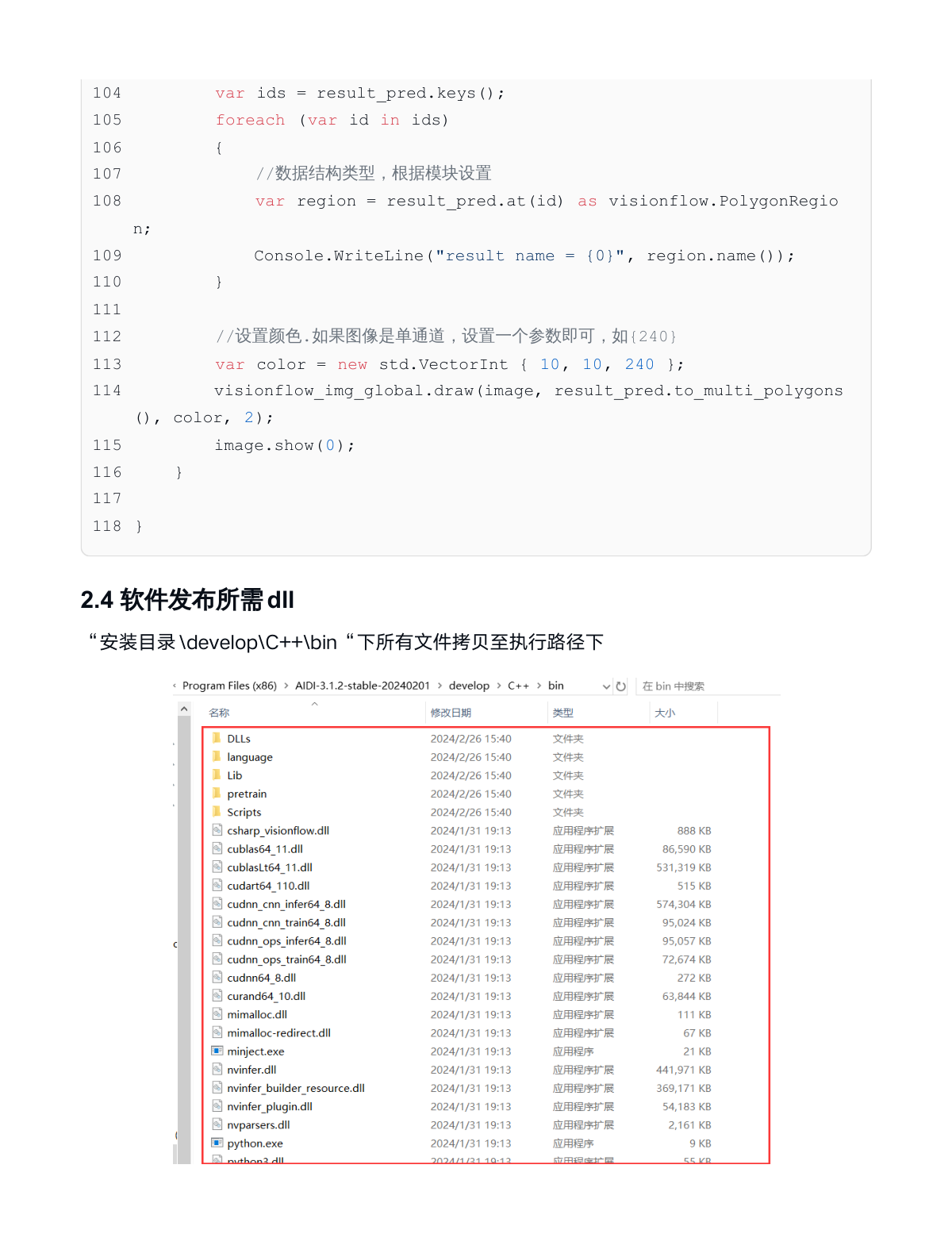
2.4 DLL Files Required for Software Release
Copy all files from "Installation Directory \develop\C++\bin" to the execution directory
3. Model Loading Considerations
3.1 "Model Path Setting" in the Model Initialization Function
3.1.1 Use "AIDI - Model - Export Model". Select the storage directory path and export model name. As shown in the figure, the export path is "D:\models"
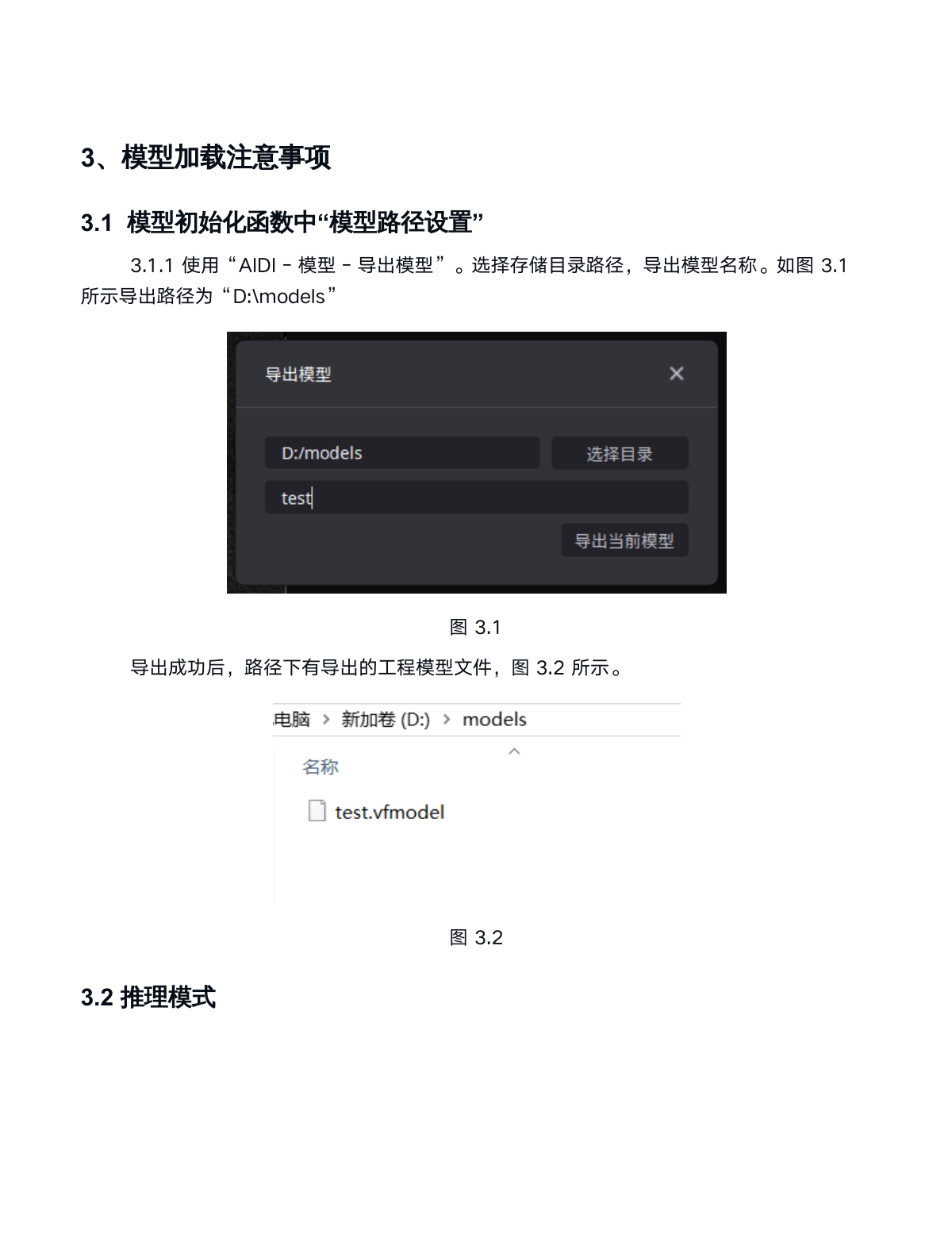
After successful export, the directory contains the exported project model file.
3.2 Inference Mode
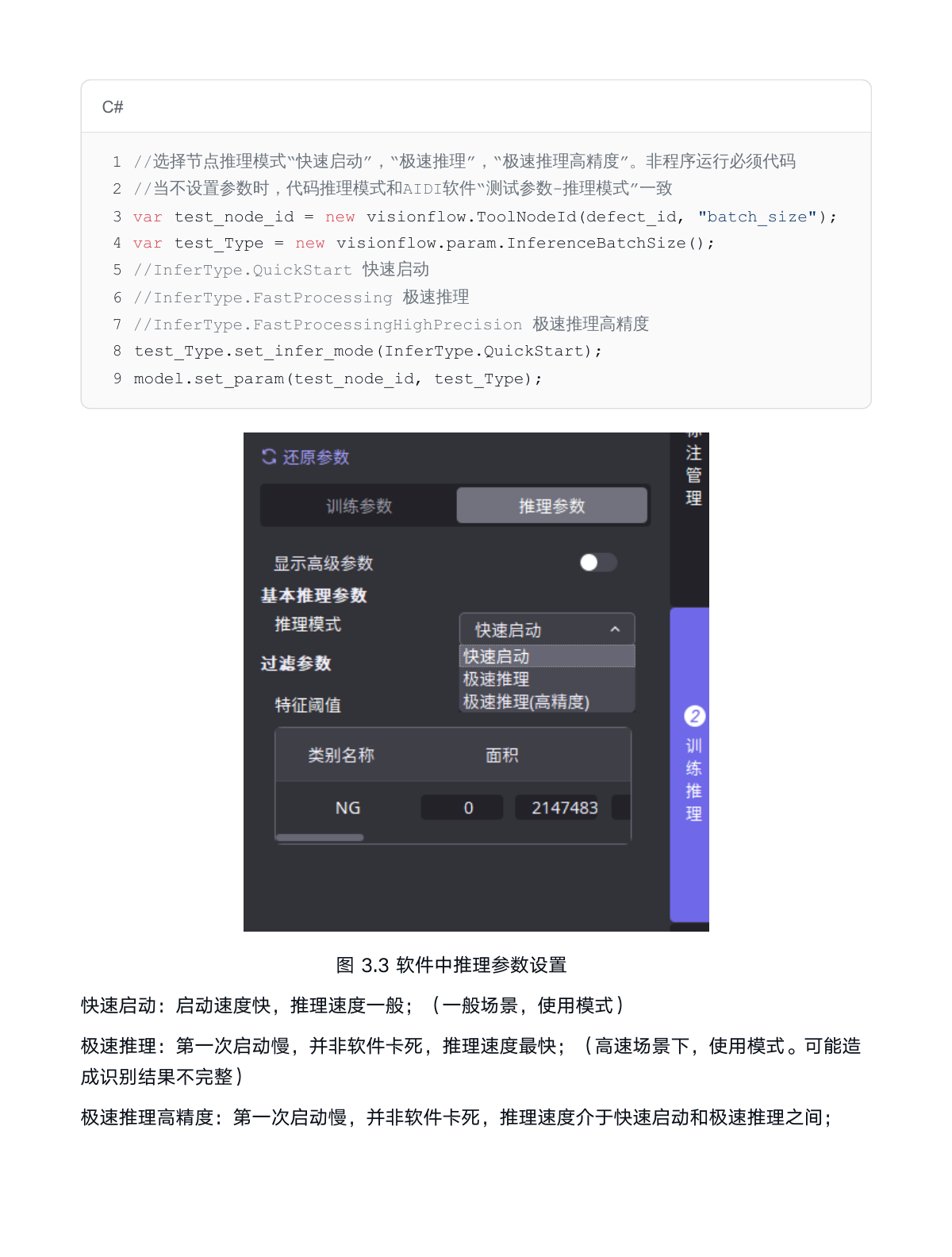
Quick Start: Fast startup speed, moderate inference speed; (general scenarios, commonly used mode)
Fast Processing: Slow first startup, not a software freeze, fastest inference speed; (high-speed scenarios. May result in incomplete recognition results)
Fast Processing High Precision: Slow first startup, not a software freeze, inference speed between Quick Start and Fast Processing;
//選擇節點推理模式「快速啟動」、「極速推理」、「極速推理高精度」。非程序運行必須代碼
//當不設定參數時,代碼推理模式和AIDI軟體「測試參數-推理模式」一致
var test_node_id = new visionflow.ToolNodeId(defect_id, "batch_size");
var test_Type = new visionflow.param.InferenceBatchSize();
//InferType.QuickStart 快速啟動
//InferType.FastProcessing 極速推理
//InferType.FastProcessingHighPrecision 極速推理高精度
test_Type.set_infer_mode(InferType.QuickStart);
model.set_param(test_node_id, test_Type);
3.3 Using Multi-threading to Accelerate Inference
3.3.1 Multi-threading Method
The following code uses a single runtime with multiple threads for parallel image inference. It is recommended to use the 3.3.2 Multiple Runtime method instead.
using System;
using System.Runtime.InteropServices;
using visionflow.param;

public class Program
{
    public static void Main()
    {
        visionflow.Model model;          //宣告模型變數
        visionflow.Runtime runtime;      //宣告模型變數

        visionflow.img.Image image1;      //宣告圖像1變數
        visionflow.img.Image image2;      //宣告圖像2變數
        visionflow.img.Image image3;      //宣告圖像3變數
        visionflow.img.Image image4;      //宣告圖像4變數
        visionflow.Sample sample1;        //宣告樣本1變數
        visionflow.Sample sample2;        //宣告樣本2變數
        visionflow.Sample sample3;        //宣告樣本3變數
        visionflow.Sample sample4;        //宣告樣本4變數
        ......
        infer_image(......)
        ......
    }

    /*Example: opening four threads*/
    static void infer_image(......)
    {
        /*建立圖片樣本*/
        sample1 = runtime.create_sample();
        sample2 = runtime.create_sample();
        sample3 = runtime.create_sample();
        sample4 = runtime.create_sample();

        string img_path1 = "圖片路徑1";
        string img_path2 = "圖片路徑2";
        string img_path3 = "圖片路徑3";
        string img_path4 = "圖片路徑4";

        var image1 = visionflow.img.Image.FromFile(img_path1);
        var image2 = visionflow.img.Image.FromFile(img_path2);
        var image3 = visionflow.img.Image.FromFile(img_path3);
        var image4 = visionflow.img.Image.FromFile(img_path4);

        /*模型推理*/
        visionflow_helpers_global.add_image_to_sample(sample1, image1, input_id);
        visionflow_helpers_global.add_image_to_sample(sample2, image2, input_id);
        visionflow_helpers_global.add_image_to_sample(sample3, image3, input_id);
        visionflow_helpers_global.add_image_to_sample(sample4, image4, input_id);

        var task1 = Task.Run(() => runtime.execute(sample1));
        var task2 = Task.Run(() => runtime.execute(sample2));
        var task3 = Task.Run(() => runtime.execute(sample3));
        var task4 = Task.Run(() => runtime.execute(sample4));

        task1.Wait();
        task2.Wait();
        task3.Wait();
        task4.Wait();
    }
    ......
}
3.3.2 Multiple Runtime Method
The following code demonstrates inference using multiple runtime instances.
using System;
using System.Runtime.InteropServices;
using visionflow.param;

public class Program
{
    public static void Main()
    {
        visionflow.Model model;          //宣告模型變數
        visionflow.Runtime runtime1;      //宣告模型變數
        visionflow.Runtime runtime2;      //宣告模型變數
        visionflow.Runtime runtime3;      //宣告模型變數
        visionflow.Runtime runtime4;      //宣告模型變數

        visionflow.img.Image image1;      //宣告圖像1變數
        visionflow.img.Image image2;      //宣告圖像2變數
        visionflow.img.Image image3;      //宣告圖像3變數
        visionflow.img.Image image4;      //宣告圖像4變數
        visionflow.Sample sample1;        //宣告樣本1變數
        visionflow.Sample sample2;        //宣告樣本2變數
        visionflow.Sample sample3;        //宣告樣本3變數
        visionflow.Sample sample4;        //宣告樣本4變數
        ......

        Load_Model(......)
        ......
    }

    private static void Load_Model(......)
    {
        ....
        runtime1 = model.create_runtime(strategy); //初始化模型
        runtime2 = model.create_runtime(strategy); //初始化模型
        runtime3 = model.create_runtime(strategy); //初始化模型
        runtime4 = model.create_runtime(strategy); //初始化模型
        ....
    }

    public static void infer_image(......)
    {
        /*建立圖片樣本*/
        sample1 = runtime1.create_sample();
        sample2 = runtime2.create_sample();
        sample3 = runtime3.create_sample();
        sample4 = runtime4.create_sample();

        img_path1 = "圖片路徑1";
        img_path2 = "圖片路徑2";
        img_path3 = "圖片路徑3";
        img_path4 = "圖片路徑4";

        image1 = visionflow.img.Image.FromFile(img_path1);
        image2 = visionflow.img.Image.FromFile(img_path2);
        image3 = visionflow.img.Image.FromFile(img_path3);
        image4 = visionflow.img.Image.FromFile(img_path4);

        /*模型推理*/
        visionflow_helpers_global.add_image_to_sample(sample1, image1, input_id);
        visionflow_helpers_global.add_image_to_sample(sample2, image2, input_id);
        visionflow_helpers_global.add_image_to_sample(sample3, image3, input_id);
        visionflow_helpers_global.add_image_to_sample(sample4, image4, input_id);

        runtime1.execute(sample1);
        runtime2.execute(sample2);
        runtime3.execute(sample3);
        runtime4.execute(sample4);
    }
    ......
}
3.4 Using CPU/GPU for Inference
Configure CPU or GPU for inference. Code example is as follows:
//設定gpu推理
strategy.options.allow_max_gpu_num = 1;
var gpu_ids = new std.VectorInt {0};
strategy.options.specified_gpu_ids = gpu_ids;
//設定cpu推理
strategy.options.allow_run_on_cpu = true;
strategy.options.allow_max_gpu_num = 0;
3.5 Using Multi-GPU Inference
When your computer has multiple GPUs, you can initialize the model on different graphics cards to speed up inference. Code example for initializing two models on two graphics cards:
/*Initialize Model 1*/
...
//Model 1 initialized on GPU 1
//GPU inference configuration code
strategy1.options.allow_max_gpu_num = 1;
var gpu_ids1 = new std.VectorInt {0};
strategy1.options.specified_gpu_ids = gpu_ids1;
//Create runtime1 on GPU 1 for Model 1 inference
var runtime1 = model1.create_runtime(strategy1);
/*Initialize Model 2*/
...
//Model 2 initialized on GPU 2
//GPU inference configuration code
strategy2.options.allow_max_gpu_num = 1;
var gpu_ids2 = new std.VectorInt {1};
strategy2.options.specified_gpu_ids = gpu_ids2;
//Create runtime2 on GPU 2 for Model 2 inference
var runtime2 = model2.create_runtime(strategy2);
3.6 Common Issues
3.6.1 Incorrect Node Parameter Settings in Program
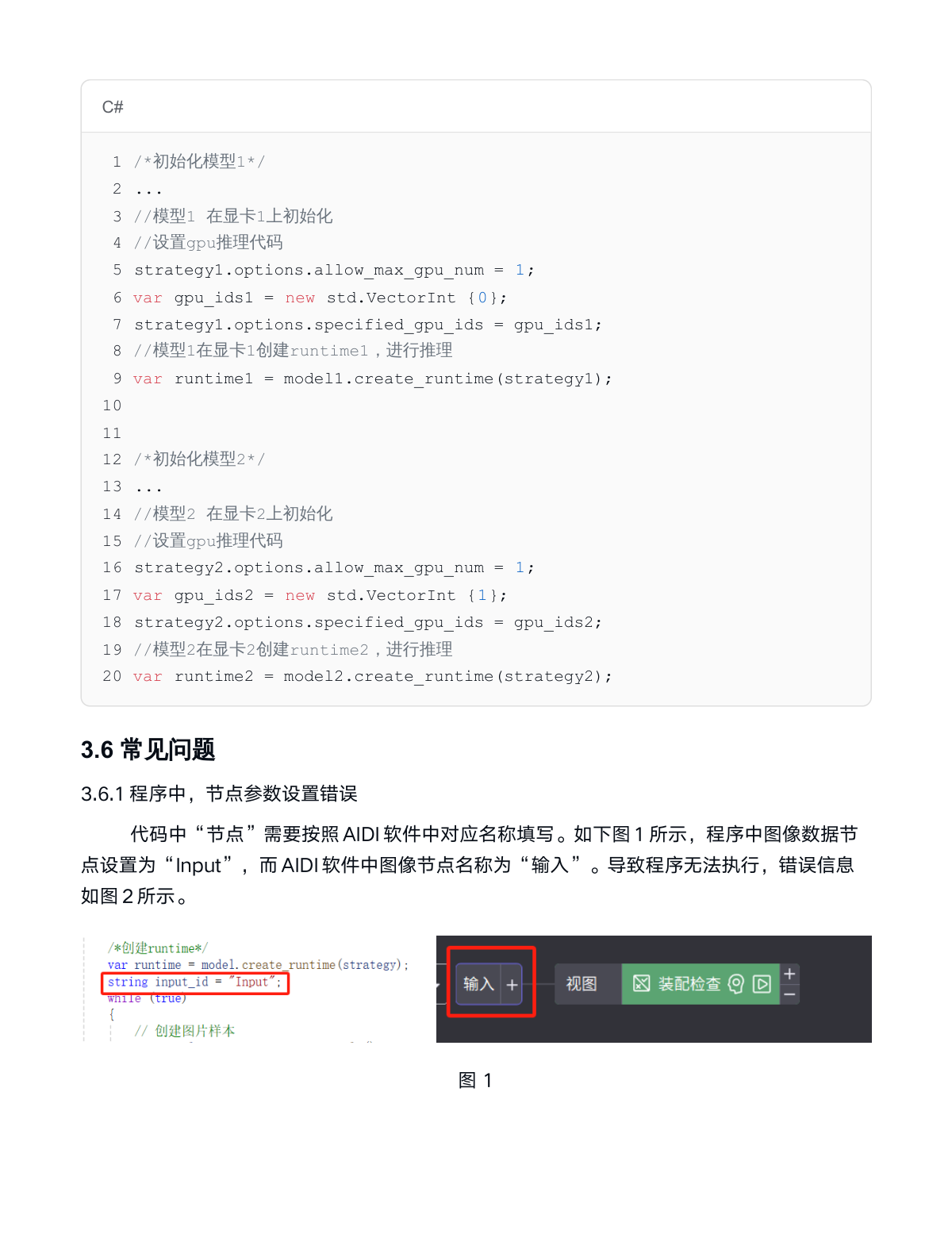
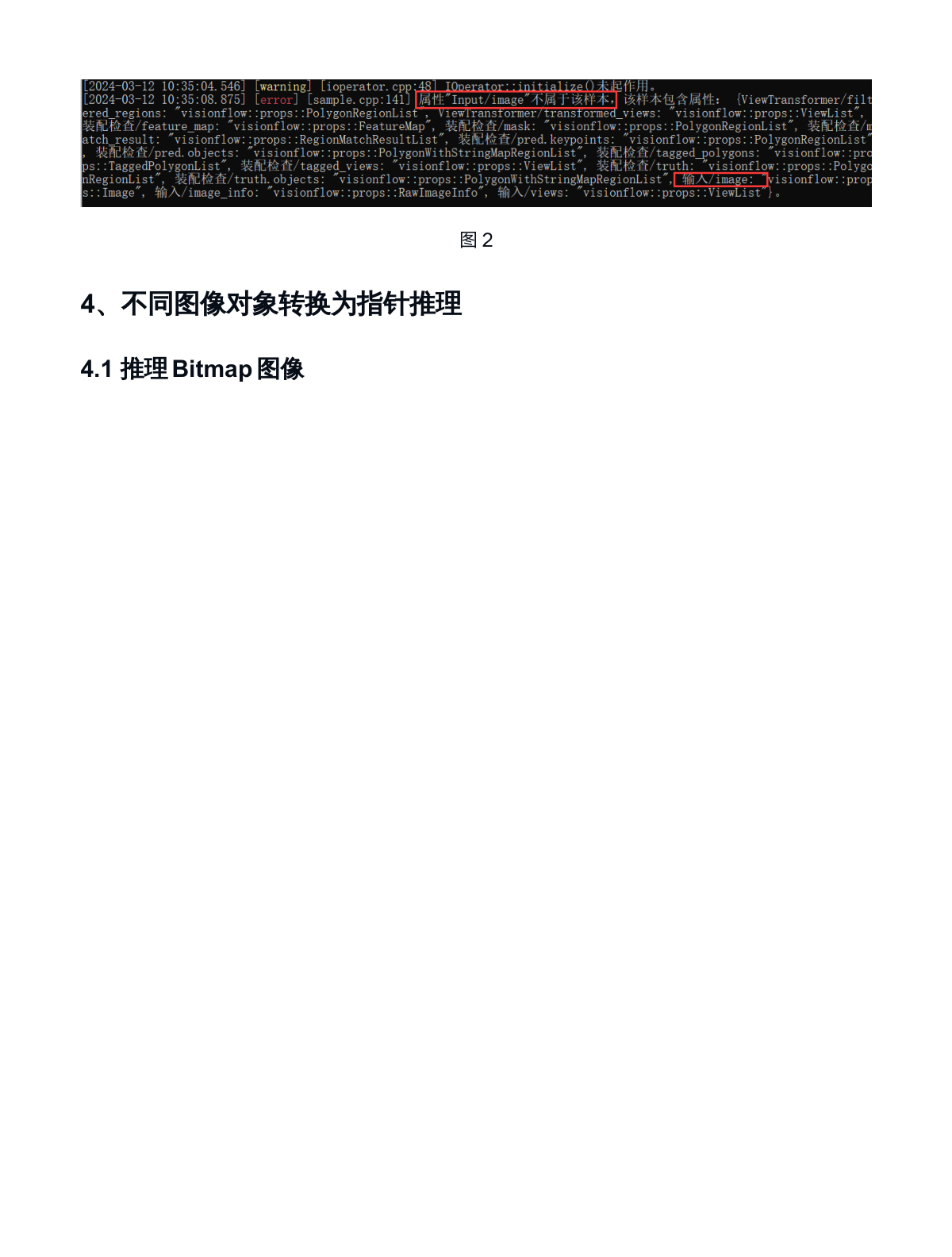
The "node" in the code must be filled according to the corresponding name in AIDI software. As shown in Figure 1 below, the image data node in the program is set to "Input", but the image node name in AIDI software is "輸入". This causes the program to fail to execute, with the error message shown in Figure 2.
4. Converting Different Image Objects to Pointers for Inference
4.1 Inferring Bitmap Images
using System.Drawing;
using System;
using visionflow.param;

public class Program
{
    ......
    /*Main function*/
    ......
    /*Model loading*/
    ......

    public static byte[] pbgra_to_bgr(byte[] bgra, int height, int width)
    {
        byte[] bgr = new byte[height * width * 3];
        for (var pos = 0; pos < height * width; pos++)
        {
            bgr[pos * 3] = bgra[pos * 4];
            bgr[pos * 3 + 1] = bgra[pos * 4 + 1];
            bgr[pos * 3 + 2] = bgra[pos * 4 + 2];
        }
        return bgr;
    }

    //bgra指針轉成bgr,根據透明度比例計算像素值
    public static byte[] bgra_to_bgr(byte[] bgra, int height, int width)
    {
        byte[] bgr = new byte[height * width * 3];
        for (var pos = 0; pos < height * width; pos++)
        {
            byte byte_scale = bgra[pos * 4 + 3];
            if (byte_scale == 255)
            {
                bgr[pos * 3] = bgra[pos * 4];
                bgr[pos * 3 + 1] = bgra[pos * 4 + 1];
                bgr[pos * 3 + 2] = bgra[pos * 4 + 2];
            }
            else
            {
                float scale = (float)bgra[pos * 4 + 3] / 255.0f;
                if (scale < 0)
                {
                    scale = 0;
                }
                if (scale > 1)
                {
                    scale = 1;
                }
                float b = (float)bgra[pos * 4] * scale;
                float g = (float)bgra[pos * 4 + 1] * scale;
                float r = (float)bgra[pos * 4 + 2] * scale;
                bgr[pos * 3] = (byte)b;
                bgr[pos * 3 + 1] = (byte)g;
                bgr[pos * 3 + 2] = (byte)r;
            }
        }
        return bgr;
    }

    public static byte[] bitmap_to_byte(ref Bitmap bmp, out int stride, out int channel_number)
    {
        var rect = new Rectangle(0, 0, bmp.Width, bmp.Height);
        var bmpData = bmp.LockBits(rect, System.Drawing.Imaging.ImageLockMode.ReadOnly, bmp.PixelFormat);
        stride = bmpData.Stride;
        string bit_number = bmp.PixelFormat.ToString();
        if (bit_number.Contains("24") || bmp.PixelFormat == PixelFormat.Format32bppArgb ||
            bmp.PixelFormat == PixelFormat.Format32bppPArgb)
        { //24位即為3通道,8位為1通道
            channel_number = 3;
        }
        else
        {
            channel_number = 1;
        }
        var rowBytes = bmpData.Width * System.Drawing.Image.GetPixelFormatSize(bmp.PixelFormat) / 8;
        var imgBytes = bmp.Height * rowBytes;
        byte[] rgbValues = new byte[imgBytes];
        IntPtr ptr = bmpData.Scan0;
        if (stride == bmpData.Width)
        {
            Marshal.Copy(ptr, rgbValues, 0, imgBytes);
        }
        else
        {
            for (var i = 0; i < bmp.Height; i++)
            {
                Marshal.Copy(ptr, rgbValues, i * rowBytes, rowBytes);  // 對齐
                ptr += stride; // next row
            }
        }
        if (channel_number == 1)// 8bit gray
        {
            var entrys = bmp.Palette.Entries;
            for (var i = 0; i < imgBytes; i++)
            {
                rgbValues[i] = entrys[rgbValues[i]].R;
            }
        }
        bmp.UnlockBits(bmpData);
        if (bmp.PixelFormat == PixelFormat.Format32bppPArgb)
        {
            rgbValues = pbgra_to_bgr(rgbValues, bmp.Height, bmp.Width);
        }
        else if (bmp.PixelFormat == System.Drawing.Imaging.PixelFormat.Format32bppArgb)
        {
            rgbValues = bgra_to_bgr(rgbValues, bmp.Height, bmp.Width);
        }
        return rgbValues;
    }
}
4.2 Inferring OpenCV Image Mat
/*Model Inference*/
public static void infer_image(......)
{
    sample = runtime.create_sample();    // 建立圖片樣本
    Bitmap bmp = (Bitmap)Bitmap.FromFile(img_path);
    uint height = (uint)bmp.Height;
    uint width = (uint)bmp.Width;
    //先將bitmap轉成byte[]
    int stride, channel;
    byte[] image_bytes = bitmap_to_byte(ref bmp, out stride, out channel);
    IntPtr ptr = System.Runtime.InteropServices.Marshal.UnsafeAddrOfPinnedArrayElement(image_bytes, 0);

    image = new visionflow.img.Image(ptr, (uint)height, (uint)width, (uint)channel, visionflow.img.Image.Depth.kDepthU8);
    /*模型推理*/
    visionflow_helpers_global.add_image_to_sample(sample, image, input_id);
    runtime.execute(sample);
}

/*結果解析*/
......
}
4.3 Inferring Halcon HImage
using System;
using visionflow.param;
using HalconDotNet;

public class Program
{
    ......
    /*Main function*/
    ......
    /*Model loading*/
    ......

    /*Model Inference*/
    public static void infer_image(......)
    {
        sample = runtime.create_sample();    // 建立圖片樣本

        HObject hl_image = new HObject();
        HOperatorSet.ReadImage(out hl_image, img_path);
        IntPtr ptr;
        HTuple width, height, channel_num;
        HOperatorSet.GetImageSize(hl_image, out width, out height);

        HObject inter_image = new HObject();
        HOperatorSet.CountChannels(hl_image, out channel_num);
        if (channel_num == 1)    // 判斷圖像通道數
        {
            HTuple type, pointer;
            HOperatorSet.GetImagePointer1(hl_image, out pointer, out type, out width, out height);
            ptr = pointer;
        }
        else if (channel_num == 3) // 判斷圖像通道數
        {
            HOperatorSet.InterleaveChannels(hl_image, out inter_image, "rgb", "match", 0);
            HTuple type, width0, height0, pointer;
            HOperatorSet.GetImagePointer1(inter_image, out pointer, out type, out width0, out height0);
            ptr = pointer;
        }
        else
        {
            throw new Exception("channel num should be 1 or 3");
        }

        var image = new visionflow.img.Image(ptr, (uint)height, (uint)width, (uint)channel_num,
                                             visionflow.img.Image.Depth.kDepthU8);
        /*模型推理*/
        visionflow_helpers_global.add_image_to_sample(sample, image, input_id);
        runtime.execute(sample);
        inter_image.Dispose();
        hl_image.Dispose();//圖像釋放
    }

    /*結果解析*/
    ......
}
4.4 Common Issues
4.4.1 Model Inference Results Inconsistent with AIDI Results
- Use image.show(0) to display the image before it is input to the model and verify that the image is correct.
- Refer to the minimal example code in section 2.3 to render the model results.
5. Parsing Inference Results
5.1 Converting Results to Corresponding Data Formats
5.1.1 Converting Model Inference Results to HRegion - Example Code
(Data structure uses the segmentation module as an example)
using System;
using visionflow.param;
using HalconDotNet;

public class Program
{
    //代碼以分割模塊的「PolygonRegionList」數據格式為例,其他模塊格式參考5.2章節
    public static void ResultToHRegion(ref visionflow.props.PolygonRegionList
            result_label, out HRegion regions, out HTuple names)
    {
        regions = new HRegion();
        regions.GenEmptyObj();
        names = new HTuple();
        //遍歷region
        var ids = result_label.keys();
        for (int i = 0; i < result_label.keys().Count; i++)
        {
            var id = result_label.keys()[i];
            var region = result_label.at(id) as visionflow.PolygonRegion;
            var outer = region.polygon().outer;
            HTuple rows = new HTuple(), cols = new HTuple();
            for (int j = 0; j < outer.Count; j++)
            {
                rows.Append(outer[j].y);
                cols.Append(outer[j].x);
            }
            rows.Append(rows[0]);
            cols.Append(cols[0]);

            HRegion outterRegion = new HRegion();
            outterRegion.GenEmptyObj();
            outterRegion.GenRegionPolygonFilled(rows, cols);

            if (region.polygon().inners.Count > 0)
            {
                //內輪廓的區域集合
                HRegion innerRegions = new HRegion();
                innerRegions.GenEmptyObj();
                foreach (var inner in region.polygon().inners)
                {
                    HTuple innerRows = new HTuple(), innerCols = new HTuple();
                    for (int j = 0; j < inner.Count; j++)
                    {
                        innerRows.Append(inner[j].y);
                        innerCols.Append(inner[j].x);
                    }
                    rows.Append(innerRows[0]);
                    cols.Append(innerCols[0]);
                    HRegion innerRegion = new HRegion();
                    innerRegion.GenEmptyObj();
                    innerRegion.GenRegionPolygonFilled(innerRows, innerCols);
                    innerRegions = innerRegions.ConcatObj(innerRegion);
                }
                //拿外輪廓減去內輪廓
                outterRegion = outterRegion.Difference(innerRegions);
            }
            regions = regions.ConcatObj(outterRegion);
            names.Append(region.name());
        }
    }

    ......
    /*Main function*/
    ......
    /*Model loading*/
    ......
    /*Model inference*/
    ......
    /*Result parsing*/
    public static void Result_analysis(......)
    {
        // 取得推理後的預測結果.
        var pred_node_id = new visionflow.ToolNodeId(defect_id, "pred");
        var result = sample.get(pred_node_id);
        var result_pred = new visionflow.props.PolygonRegionList();
        result_pred.from_json(result.to_json());
        HOperatorSet.SetSystem("clip_region", "false");
        ResultToHRegion(ref result_pred, out HRegion regions, out HTuple names);
        ......
    }
}
5.1.2 Converting Model Inference Results to OpenCV Contours - Example Code
(Data structure uses the segmentation module as an example)
using System;
using visionflow.param;
using OpenCvSharp;

public class Program
{
    public static void ResultToContour(ref visionflow.props.PolygonRegionList
        result_label, out List<List<OpenCvSharp.Point>> Contours,
        out List<string> names)
    {
        Contours = new List<List<OpenCvSharp.Point>>();
        names = new List<string>();
        for (int i = 0; i < result_label.keys().Count; i++)
        {
            var id = result_label.keys()[i];
            var region = result_label.at(id) as visionflow.PolygonRegion;
            var outer = region.polygon().outer;
            List<OpenCvSharp.Point> points = new List<OpenCvSharp.Point>();
            for (int j = 0; j < outer.Count; j++)
            {
                points.Add(new OpenCvSharp.Point(outer[j].x, outer[j].y));
            }

            Contours.Add(points);
            names.Add(region.name());
        }
    }

    ......
    /*Main function*/
    ......
    /*Model loading*/
    ......

    /*Model inference*/
    ......

    /*Result parsing*/
    public static void Result_analysis(......)
    {
        // 取得推理後的預測結果.
        var pred_node_id = new visionflow.ToolNodeId(defect_id, "pred");
        var result = sample1.get(pred_node_id);
        var result_pred = new visionflow.props.PolygonRegionList();
        result_pred.from_json(result.to_json());

        List<List<OpenCvSharp.Point>> Contours = new List<List<OpenCvSharp.Point>>();
        List<string> names = new List<string>();
        ResultToContour(ref result_pred, out Contours, out names);
        ......
    }
}
5.2 Result Retrieval and Parsing Methods for Different Modules
Explanation of result storage and retrieval for each module:
5.2.1 Classification Module
Result Data Storage Format: visionflow.props.MultiNamesPolygonRegionList
After iterating through MultiNamesPolygonRegionList and obtaining MultiNamesPolygonRegion, you can retrieve the following information:
/*Model Inference*/
...
/*Result Parsing*/
var pred_node_id = new visionflow.ToolNodeId(defect_id, "pred");
var result = sample1.get(pred_node_id);
var result_pred = new visionflow.props.MultiNamesPolygonRegionList();
result_pred.from_json(result.to_json());
var ids = result_pred.keys();

//ok為用戶自定義類別,因此模型返回結果 ids 不會為空
foreach (var id in ids)
{
    var region = result_pred.at(id) as visionflow.MultiNamesPolygonRegion;
    var name = region.name();    //缺陷名字
    var score = region.score();  //缺陷得分
}
5.2.2 Unsupervised Classification Module
Result Data Storage Format: visionflow.props.PolygonRegionList
After iterating through PolygonRegionList and obtaining PolygonRegion, you can retrieve the following information:
/*Model Inference*/
...
/*Result Parsing*/
var pred_node_id = new visionflow.ToolNodeId(defect_id, "pred");
var result = sample1.get(pred_node_id);
var result_pred = new visionflow.props.PolygonRegionList();
result_pred.from_json(result.to_json());
var ids = result_pred.keys();

//ids為空時,該圖像為ok。與分類模塊判斷ok方式不同
foreach (var id in ids)
{
    var region = result_pred.at(id) as visionflow.PolygonRegion;
    var name = region.name();        //缺陷名字
    var score = region.score();      //缺陷得分
}
5.2.3 Segmentation Module
Result Data Storage Format: visionflow.props.PolygonRegionList
After iterating through PolygonRegionList and obtaining PolygonRegion, you can retrieve the following information:
/*Model Inference*/
...
/*Result Parsing*/
var pred_node_id = new visionflow.ToolNodeId(defect_id, "pred");
var result = sample1.get(pred_node_id);
var result_pred = new visionflow.props.PolygonRegionList();
result_pred.from_json(result.to_json());
var ids = result_pred.keys();

//ids為空時,該圖像為ok。與分類模塊判斷ok方式不同
foreach (var id in ids)
{
    var region = result_pred.at(id) as visionflow.PolygonRegion;
    var name = region.name();        //缺陷名字
    var score = region.score();      //缺陷得分
}
5.2.4 Unsupervised Segmentation Module
Result Data Storage Format: visionflow.props.PolygonRegionList
After iterating through PolygonRegionList and obtaining PolygonRegion, you can retrieve the following information:
/*Model Inference*/
...
/*Result Parsing*/
var pred_node_id = new visionflow.ToolNodeId(defect_id, "pred");
var result = sample1.get(pred_node_id);
var result_pred = new visionflow.props.PolygonRegionList();
result_pred.from_json(result.to_json());
var ids = result_pred.keys();

//ids 為空時,表示圖像表示沒有識別結果
foreach (var id in ids)
{
    var region = result_pred.at(id) as visionflow.PolygonRegion;
    var name = region.name();        //缺陷名字
    var area = region.area();        //缺陷面積
    var outer = region.polygon().outer;    //缺陷外輪廓點集合
    var inners = region.polygon().inners;  //缺陷內輪廓點集合
}
5.2.5 Detection Module
Result Data Storage Format: visionflow.props.PolygonRegionList
After iterating through PolygonRegionList and obtaining PolygonRegion, you can retrieve the following information:
/*Model Inference*/
...
/*Result Parsing*/
var pred_node_id = new visionflow.ToolNodeId(defect_id, "pred");
var result = sample1.get(pred_node_id);
var result_pred = new visionflow.props.PolygonRegionList();
result_pred.from_json(result.to_json());
var ids = result_pred.keys();

//ids 為空時,表示圖像表示沒有識別結果
foreach (var id in ids)
{
    var region = result_pred.at(id) as visionflow.PolygonRegion;
    var name = region.name();        //缺陷名字
    var score = region.score();      //缺陷得分
    var area = region.area();        //缺陷面積
    var outer = region.polygon().outer;    //缺陷外輪廓點
}
5.2.6 Localization Module
Result Data Storage Format: visionflow.props.PolygonRegionList
After iterating through PolygonRegionList and obtaining PolygonRegion, you can retrieve the following information:
/*Model Inference*/
...
/*Result Parsing*/
var pred_node_id = new visionflow.ToolNodeId(defect_id, "pred");
var result = sample1.get(pred_node_id);
var result_pred = new visionflow.props.PolygonRegionList();
result_pred.from_json(result.to_json());
var ids = result_pred.keys();

//ids 為空時,表示圖像表示沒有識別結果
foreach (var id in ids)
{
    var region = result_pred.at(id) as visionflow.PolygonRegion;
    var name = region.name();        //缺陷名字
    var score = region.score();      //缺陷得分
    var area = region.area();        //缺陷面積
    var outer = region.polygon().outer;    //缺陷輪廓
    var x1 = outer[0].x; var y1 = outer[0].y;  //缺陷矩形輪廓4個點位置
    var x2 = outer[1].x; var y2 = outer[1].y;
    var x3 = outer[2].x; var y3 = outer[2].y;
    var x4 = outer[3].x; var y4 = outer[3].y;
}
5.2.7 Character Recognition Module
(1) Without String Template
Result Data Storage Format: visionflow.props.MultiNamesPolygonRegionList
After iterating through MultiNamesPolygonRegionList and obtaining MultiNamesPolygonRegion, you can retrieve the following information:
/*Model Inference*/
...
/*Result Parsing*/
//不使用模版時,參數為「pred.keypoints」
//使用模版時,參數為「pred.objects」
var pred_node_id = new visionflow.ToolNodeId(defect_id, "pred.keypoints");
var result = sample1.get(pred_node_id);
var result_pred = new visionflow.props.PolygonRegionList();
result_pred.from_json(result.to_json());
var ids = result_pred.keys();

//ids 為空時,表示圖像表示沒有識別結果
foreach (var id in ids)
{
    var region = result_pred.at(id) as visionflow.PolygonRegion;
    var name = region.name();        //缺陷名字
    var score = region.score();      //缺陷得分
    var area = region.area();        //缺陷面積
    var radian = region.angle().radian.ToString();    //缺陷偏轉角度-弧度單位
    var outer = region.polygon().outer;    //缺陷外輪廓點
    var x1 = outer[0].x; var y1 = outer[0].y;  //缺陷矩形輪廓4個點位置
    var x2 = outer[1].x; var y2 = outer[1].y;
    var x3 = outer[2].x; var y3 = outer[2].y;
    var x4 = outer[3].x; var y4 = outer[3].y;
}
(2) With String Template
Result Data Storage Format: visionflow.props.PolygonRegionList
After iterating through PolygonRegionList and obtaining PolygonRegion, you can retrieve the following information:
/*Model Inference*/
...
/*Result Parsing*/
var pred_node_id = new visionflow.ToolNodeId(defect_id, "pred.characters");
var result = sample1.get(pred_node_id);
var result_pred = new visionflow.props.MultiNamesPolygonRegionList();
result_pred.from_json(result.to_json());
var ids = result_pred.keys();

//ids 為空時,表示圖像表示沒有識別結果
foreach (var id in ids)
{
    var region = result_pred.at(id) as visionflow.MultiNamesPolygonRegion;
    var name = region.name();        //字符名字
    var score = region.score();      //字符得分
    var area = region.area();        //字符面積
    var outer = region.polygon().outer;    //字符外輪廓點
}
5.2.8 Assembly Inspection Module
(This module must use template)
Result Data Storage Format: visionflow.props.PolygonWithStringMapRegionList
After iterating through PolygonWithStringMapRegionList and obtaining PolygonWithStringMapRegion, you can retrieve the following information:
/*Model Inference*/
...
/*Result Parsing*/
var pred_node_id = new visionflow.ToolNodeId(defect_id, "pred.strings");
var result = sample1.get(pred_node_id);
var result_pred = new visionflow.props.PolygonRegionList();
result_pred.from_json(result.to_json());
var ids = result_pred.keys();

//ids 為空時,該圖像表示沒有識別出結果
foreach (var id in ids)
{
    var region = result_pred.at(id) as visionflow.PolygonRegion;
    var name = region.name();        //字符串名字
    var score = region.score();      //字符串得分
    var area = region.area();        //字符串面積
    var outer = region.polygon().outer;    //字符串外輪廓點
}
5.2.9 Comprehensive Decision Module
Result Data Storage Format: visionflow.props.StringMessage()
The model inference can retrieve the following information:
/*Model Inference*/
...
/*Result Parsing*/
var pred_node_id = new visionflow.ToolNodeId(defect_id, "pred.objects");
var result = sample1.get(pred_node_id);
var result_pred = new visionflow.props.PolygonWithStringMapRegionList();
result_pred.from_json(result.to_json());
var ids = result_pred.keys();

//ok為自定義類別,因此模型返回結果 ids 不會為空
foreach (var id in ids)
{
    var region = result_pred.at(id) as visionflow.PolygonWithStringMapRegion;
    var name = region.name();        //結果名字
}
Or:
/*Model Inference*/
...
/*Result Parsing*/
var pred_node_id = new visionflow.ToolNodeId(defect_id, "integration_class");
var result = sample1.get(pred_node_id);
var result_pred = new visionflow.props.StringMessage();
result_pred.from_json(result.to_json());
var result_name = result_pred.get();  //結果名字
5.3 Common Issues
5.3.1 How to Calculate the Bounding Rectangle and Center Point of Defects (Using Segmentation Module as Example)
/*Model Inference*/
...
/*Result Parsing*/
var pred_node_id = new visionflow.ToolNodeId(defect_id, "pred");
var result = sample1.get(pred_node_id);
var result_pred = new visionflow.props.PolygonRegionList();
result_pred.from_json(result.to_json());
var ids = result_pred.keys();

//ids 為空時,該圖像表示沒有識別出結果
foreach (var id in ids)
{
    var region = result_pred.at(id) as visionflow.PolygonRegion;
    var name = region.name();        //缺陷名字
    var area = region.area();        //缺陷面積
    var outer = region.polygon().outer;    //缺陷外輪廓點集合
    List<OpenCvSharp.Point> points = new List<OpenCvSharp.Point>();
    for (int j = 0; j < outer.Count; j++)
    {
        points.Add(new OpenCvSharp.Point(outer[j].x, outer[j].y));
    }
    //傾斜最小外接矩形
    RotatedRect r_rect = Cv2.MinAreaRect(points);
    //缺陷中心點
    var center_x = r_rect.Center.X;
    var center_y = r_rect.Center.Y;
    //最小包圍盒
    Rect bounding_rect = r_rect.BoundingRect();
}
6. High-Speed Machine Considerations for Accelerating Program Inference Speed
1. Enable Fast Processing Mode
When initializing the model, set the inference mode to Fast Processing "InferType.FastProcessing". The model loading time in fast processing mode is typically tens of seconds, which is normal and not a freeze;
2. Set GPU Frequency
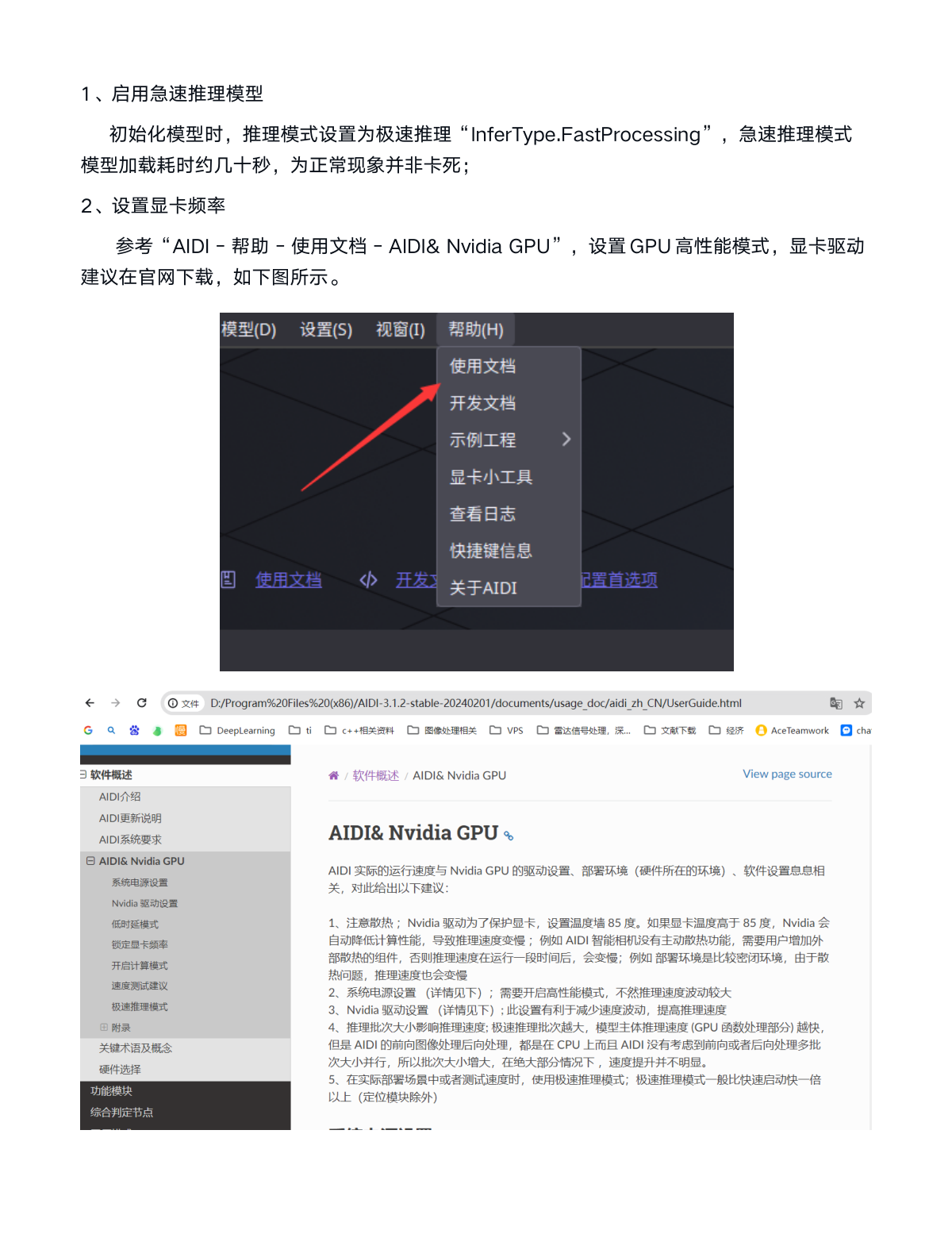
Refer to "AIDI - Help - User Guide - AIDI & Nvidia GPU" to set GPU to high-performance mode. It is recommended to download GPU drivers from the official Nvidia website.
3. AIDI Divides One Large Image into Multiple Small Images
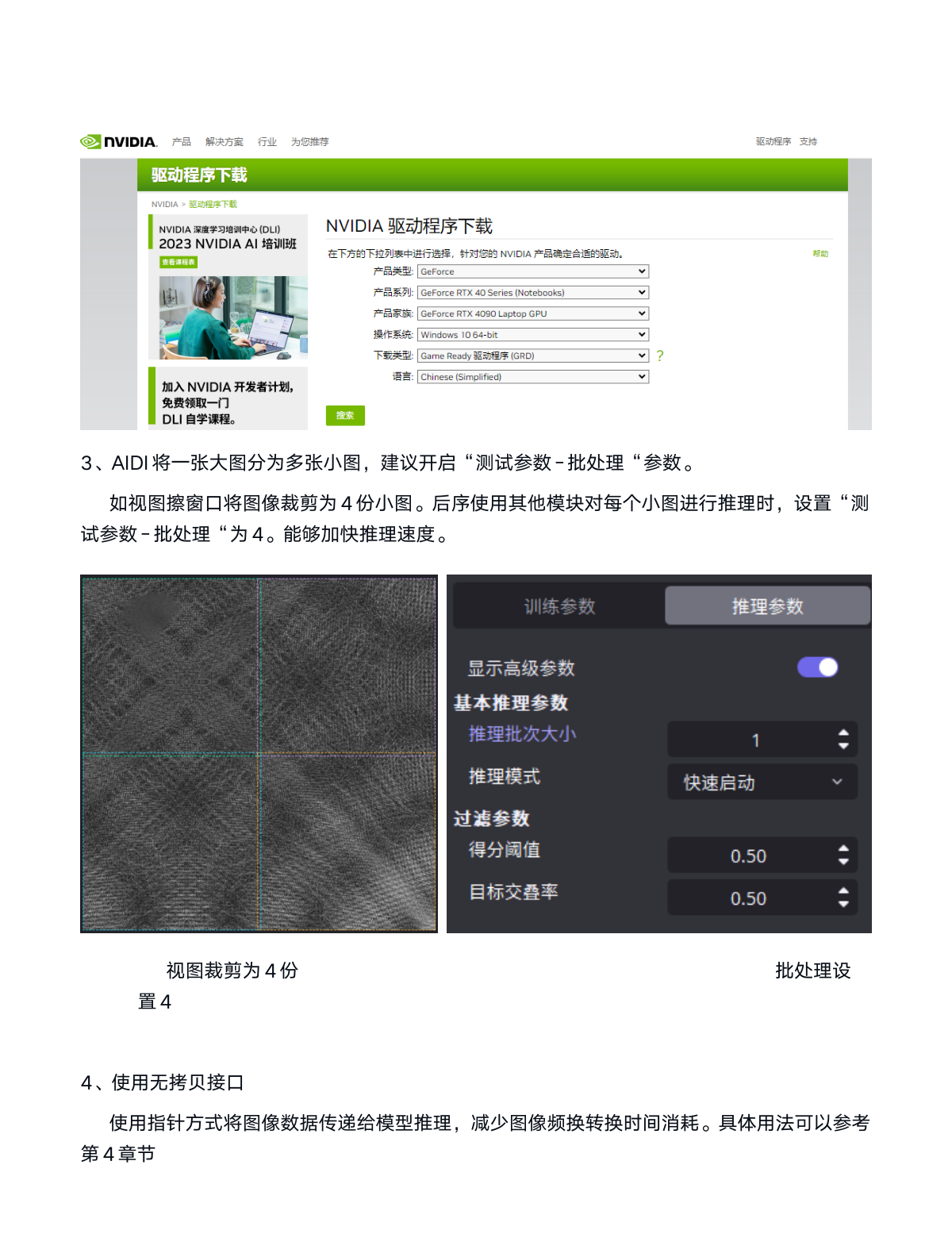
It is recommended to enable the "Test Parameters - Batch Processing" option. For example, if the image cropping window divides the image into 4 smaller images, when using other modules to infer on each small image, set "Test Parameters - Batch Processing" to 4. This can accelerate inference speed.
4. Use Zero-Copy Interface
Use pointer method to pass image data to model inference, reducing the time consumption of image format conversion. For detailed usage, refer to section 4:
/*Image Conversion*/
var image = new visionflow.img.Image(ptr, (uint)height, (uint)width,
    (uint)channel_num, visionflow.img.Image.Depth.kDepthU8);
/*Model Inference*/
visionflow_helpers_global.add_image_to_sample(sample, image, input_id);
7. Recommended Industrial PC Configuration
- CPU: i7-10th generation or higher
- RAM: 32GB or higher (recommended to use multi-channel configuration, such as 16GB x 2)
- Storage: Solid State Drive
8. Other Common Issues
1. Software Inference Results are Inconsistent with Secondary Development Results
1.1 Verify that the input image is correct. Refer to section 2.3 and render the image to display it.
1.2 Verify that the loaded model is correct. Refer to section 3.1.
1.3 Use image.show(0) to display the image before it is input to the model and verify that the image is normal.
2. Node Configuration Error Causes Model Loading to Fail
Refer to section 3.6.1.
3. Inference Speed is Unstable
3.1 When the GPU is not in use, it automatically reduces its frequency, which causes unstable inference time. For scenarios with high requirements on inference time, refer to section 6 for configuration.
Document End